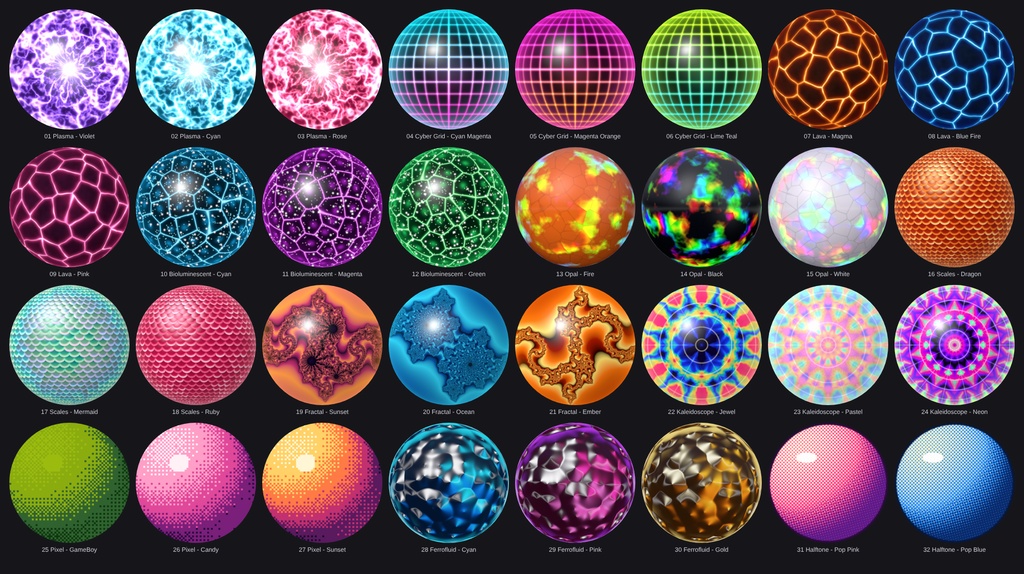
Exotic Matcap Pack - 32 Matcaps
- ダウンロード商品¥ 215
32 unusual, high-resolution matcaps you will not find in the usual packs: electric plasma, neon cyber grids, glowing lava cracks, bioluminescent cells, play-of-color opals, dragon scales, fractals, kaleidoscopes, pixel art, spiky ferrofluid and pop-art halftone. Every matcap is a 1024x1024 PNG, ready to drop into the matcap slot of lilToon, Poiyomi or any other shader with a matcap slot. Features - 32 matcaps in 11 categories, 2-3 color variants each - 1024 x 1024 PNG, sRGB, no alpha channel - Standard matcap layout: the sphere fills the whole texture, corners are smooth, no seams - Procedurally generated: no photos and no third-party artwork - Clean folder structure with English file names - Works with any shader that has a matcap slot Included (32) Plasma (3): Violet, Cyan, Rose Cyber Grid (3): Cyan_Magenta, Magenta_Orange, Lime_Teal Lava (3): Magma, Blue_Fire, Pink Bioluminescent (3): Cyan, Magenta, Green Opal (3): Fire, Black, White Scales (3): Dragon, Mermaid, Ruby Fractal (3): Sunset, Ocean, Ember Kaleidoscope (3): Jewel, Pastel, Neon Pixel (3): GameBoy, Candy, Sunset Ferrofluid (3): Cyan, Pink, Gold Halftone (2): Pop_Pink, Pop_Blue + "all matcaps.png" overview sheet Requirements - Unity (for VRChat: the Unity version required by the current VRChat SDK) - A shader with a matcap slot (lilToon, Poiyomi, ...) How to use 1. Import the PNGs into your Unity project. 2. Recommended import settings: Texture Type = Default, sRGB = On, Wrap Mode = Clamp, Generate Mip Maps = On, Compression = Normal Quality (High Quality if you see banding in dark gradients). 3. Assign the texture to the Matcap slot of your material. 4. Choose the blend mode: - Dark, glowing matcaps (Plasma, Cyber Grid, Lava, Bioluminescent, Ferrofluid, Opal Black) look best with Add or Screen. - Full-color matcaps (Fractal, Kaleidoscope, Halftone, Pixel, Scales, Opal Fire / White) work well with Normal or Replace, or with a lowered strength. 5. Optional for the Pixel matcaps: set Filter Mode to Point (no filter) to keep the pixels perfectly sharp.
Terms of Service
You MAY: - Use the matcaps on your own avatars, worlds and 3D models in VRChat and on other platforms, for personal and commercial projects (images, videos, streams, commissioned work). - Edit, recolor and resize the textures for your own projects. - Use them as part of a finished product (e.g. an avatar or world you sell), as long as the matcaps are not offered as standalone or reusable files. You MAY NOT: - Redistribute, resell, share or upload the original or modified matcap files (single files or as a pack), free or paid, on any platform (Discord, BOOTH, Gumroad, cloud links, ...). - Include the textures in a package, prefab or avatar base that you sell or give away where the buyer can extract and reuse them. - Claim the textures as your own work or sell them as your own matcap pack. - Use them for illegal, hateful or discriminatory content. Credit is not required, but appreciated. One purchase = one license for the buyer. Please do not share your copy with others. The textures are provided "as is". Because this is a digital product, refunds are not possible after purchase.
Update information
v1.0.0 (2026-10-09) - Initial release