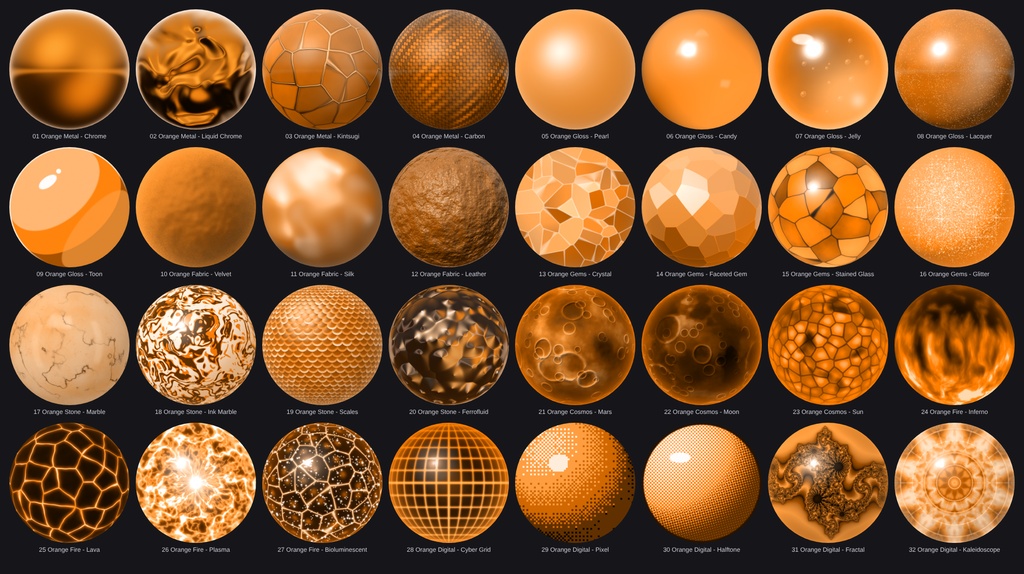
Orange_Matcap Pack - 32 Matcaps
- ダウンロード商品¥ 200
32 high-resolution matcaps in one single color: orange. No color variants, no red or yellow shifts. Every matcap is a different material, all graded to the same orange hue, so they match perfectly on one avatar. From glossy candy, velvet and lacquer to chrome, lava, plasma, craters and stained glass. Every matcap is a 1024x1024 PNG, ready to drop into the matcap slot of lilToon, Poiyomi or any other shader with a matcap slot. ■ Features - 32 different materials in 8 categories, all in orange only - One consistent orange hue across the whole pack - 1024 x 1024 PNG, sRGB, no alpha channel - Standard matcap layout: the sphere fills the whole texture, corners are smooth, no seams - Procedurally generated: no photos and no third-party artwork - Clean folder structure with English file names - Works with any shader that has a matcap slot ■ Included (32) Orange Metal (4): Chrome, Liquid_Chrome, Kintsugi, Carbon Orange Gloss (5): Pearl, Candy, Jelly, Lacquer, Toon Orange Fabric (3): Velvet, Silk, Leather Orange Gems (4): Crystal, Faceted_Gem, Stained_Glass, Glitter Orange Stone (4): Marble, Ink_Marble, Scales, Ferrofluid Orange Cosmos (3): Mars, Moon, Sun Orange Fire (4): Inferno, Lava, Plasma, Bioluminescent Orange Digital (5): Cyber_Grid, Pixel, Halftone, Fractal, Kaleidoscope + "all matcaps.png" overview sheet ■ Requirements - Unity (for VRChat: the Unity version required by the current VRChat SDK) - A shader with a matcap slot (lilToon, Poiyomi, ...) ■ How to use 1. Import the PNGs into your Unity project. 2. Recommended import settings: Texture Type = Default, sRGB = On, Wrap Mode = Clamp, Generate Mip Maps = On, Compression = Normal Quality (High Quality if you see banding in dark gradients). 3. Assign the texture to the Matcap slot of your material. 4. Choose the blend mode: - Dark, glowing matcaps (Inferno, Lava, Plasma, Bioluminescent, Cyber_Grid, Carbon, Velvet, Lacquer, Moon) look best with Add or Screen. - Full-color matcaps (all others) work well with Normal or Replace, or with a lowered strength. 5. Optional for the Pixel matcap: set Filter Mode to Point (no filter) to keep the pixels perfectly sharp. ■ Please note - Matcaps are view-space textures: the pattern follows the camera and does not stick to the mesh. This is how all matcaps work. - The final look depends on your shader, blend mode, strength and lighting. Shaders with tone mapping or color grading can shift the orange. - Very bright highlights are near-white and very dark areas are near-black, as in every material. All colored areas stay orange. - Textures only. No shader, avatar or 3D model is included. - A very light noise is baked into most matcaps (not Pixel and Halftone) to avoid banding after texture compression. - Please read the Terms of Service before use.
Terms of Service
You MAY: - Use the matcaps on your own avatars, worlds and 3D models in VRChat and on other platforms, for personal and commercial projects (images, videos, streams, commissioned work). - Edit, recolor and resize the textures for your own projects. - Use them as part of a finished product (e.g. an avatar or world you sell), as long as the matcaps are not offered as standalone or reusable files. You MAY NOT: - Redistribute, resell, share or upload the original or modified matcap files (single files or as a pack), free or paid, on any platform (Discord, BOOTH, Gumroad, cloud links, ...). - Include the textures in a package, prefab or avatar base that you sell or give away where the buyer can extract and reuse them. - Claim the textures as your own work or sell them as your own matcap pack. - Use them for illegal, hateful or discriminatory content. Credit is not required, but appreciated. One purchase = one license for the buyer. Please do not share your copy with others. The textures are provided "as is". Because this is a digital product, refunds are not possible after purchase.aa
Update information
v1.0.0 (2026-10-09) - Initial release