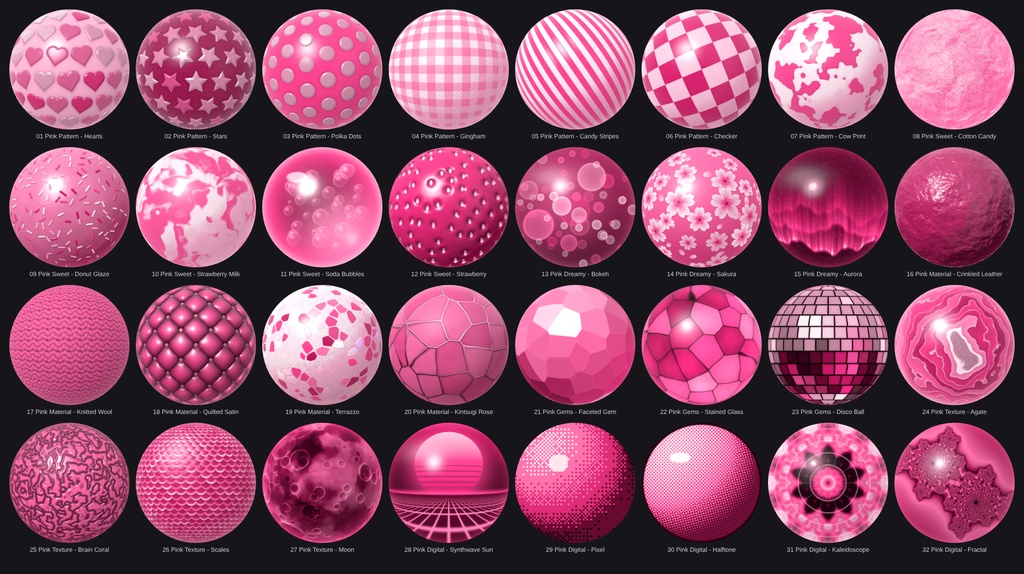
Pink Matcap Pack - 32 Matcaps
- ダウンロード商品¥ 200
■ Pink Matcap Pack – 32 MatCap textures, all in pink 32 hand-tuned MatCap textures that stay in one pink colour family – from soft pastel to hot pink and deep rose. No two matcaps look alike: patterns, sweets, dreamy scenes, fabrics, gems, textures and retro looks. ■ Features - 32 matcaps, 1024×1024 px, PNG (RGB) - Everything is pink – only white highlights stay neutral - 7 categories with very different looks, not just colour variations - Full-sphere layout (the sphere fills the whole image) – works with every standard MatCap shader slot - Overview image included, so you can pick the right one quickly ■ Included (32) Pink_Pattern (7): Hearts, Stars, Polka Dots, Gingham, Candy Stripes, Checker, Cow Print Pink_Sweet (5): Cotton Candy, Donut Glaze (with sprinkles), Strawberry Milk, Soda Bubbles, Strawberry Pink_Dreamy (3): Bokeh, Sakura (cherry blossoms), Aurora Pink_Material (5): Crinkled Leather, Knitted Wool, Quilted Satin, Terrazzo, Kintsugi Rose Pink_Gems (3): Faceted Gem, Stained Glass, Disco Ball Pink_Texture (4): Agate, Brain Coral, Scales, Moon Pink_Digital (5): Synthwave Sun, Pixel, Halftone, Kaleidoscope, Fractal + "all matcaps.png" (overview of all 32) ■ Requirements - Unity (any version that can import PNG textures) - A shader with a MatCap slot, e.g. lilToon, Poiyomi, or any other MatCap shader - Made with VRChat avatars and worlds in mind, but usable in any Unity project ■ How to use 1. Import the PNG files into your Unity project. 2. In the texture import settings: Texture Type "Default", Wrap Mode "Clamp", Generate Mip Maps ON. 3. Assign the texture to the MatCap slot of your material. 4. Adjust the MatCap strength and blend mode (normal / add / multiply / screen) to taste. ■ Please note - MatCaps are view-based: the pattern matcaps (hearts, stars, gingham, ...) look like they are "painted onto a ball" and follow the camera. This is normal. For a subtle effect lower the MatCap strength or use a multiply/add blend mode. - Because the colour is baked into the texture, the final colour also depends on your shader's MatCap settings. - The textures were created procedurally with custom scripts. - Colours on your screen may differ slightly depending on your display and Unity colour space.
Terms of Service
You MAY: - Use the matcaps on your own avatars, worlds and 3D models in VRChat and on other platforms, for personal and commercial projects (images, videos, streams, commissioned work). - Edit, recolor and resize the textures for your own projects. - Use them as part of a finished product (e.g. an avatar or world you sell), as long as the matcaps are not offered as standalone or reusable files. You MAY NOT: - Redistribute, resell, share or upload the original or modified matcap files (single files or as a pack), free or paid, on any platform (Discord, BOOTH, Gumroad, cloud links, ...). - Include the textures in a package, prefab or avatar base that you sell or give away where the buyer can extract and reuse them. - Claim the textures as your own work or sell them as your own matcap pack. - Use them for illegal, hateful or discriminatory content. Credit is not required, but appreciated. One purchase = one license for the buyer. Please do not share your copy with others. The textures are provided "as is". Because this is a digital product, refunds are not possible after purchase.aa
Update information
v1.0.0 (2026-10-09) - Initial release