Green Matcap Pack - 64 Matcaps
- ダウンロード商品¥ 390
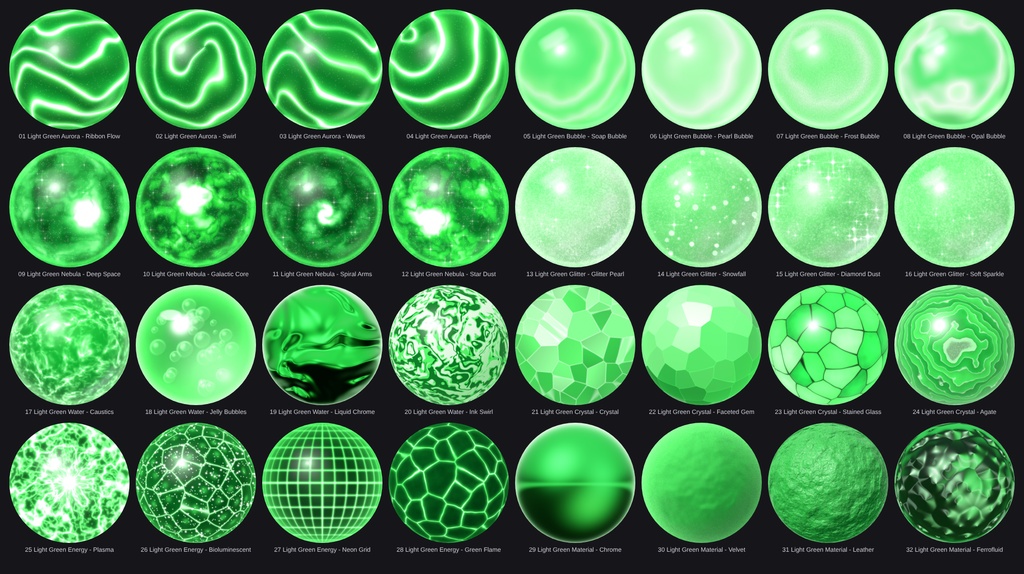
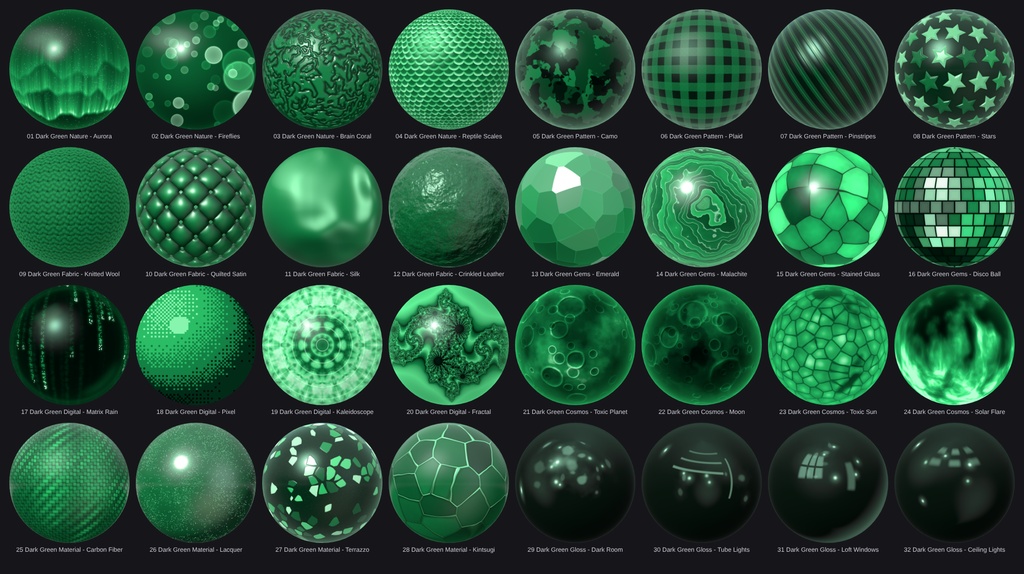
64 matcap textures in green: 32 in bright light green and 32 in deep dark green. Two complete packs in one download - glossy glass orbs on the light side, and a completely different mix of patterns, fabrics, gems, planets and dark glossy reflections on the dark side. Every matcap stays inside its green color family, so they fit together perfectly. [Features] - 64 matcaps, 1024 x 1024 px, PNG (RGB) - Pack 1: Light Green - 32 matcaps in bright mint and fresh green (glossy glass-orb style) - Pack 2: Dark Green - 32 matcaps in deep emerald and forest green (patterns, fabrics, gems, digital, cosmos, materials, gloss) - Sorted into 16 categories with 4 matcaps each - Works with any shader that has a matcap slot (lilToon, Poiyomi, etc.) - No tiling needed - one texture, one matcap slot [Categories - Light Green] - Aurora: Ribbon Flow, Swirl, Waves, Ripple - Bubble: Soap Bubble, Pearl Bubble, Frost Bubble, Opal Bubble - Nebula: Deep Space, Galactic Core, Spiral Arms, Star Dust - Glitter: Glitter Pearl, Snowfall, Diamond Dust, Soft Sparkle - Water: Caustics, Jelly Bubbles, Liquid Chrome, Ink Swirl - Crystal: Crystal, Faceted Gem, Stained Glass, Agate - Energy: Plasma, Bioluminescent, Neon Grid, Green Flame - Material: Chrome, Velvet, Leather, Ferrofluid [Categories - Dark Green] - Nature: Aurora, Fireflies, Brain Coral, Reptile Scales - Pattern: Camo, Plaid, Pinstripes, Stars - Fabric: Knitted Wool, Quilted Satin, Silk, Crinkled Leather - Gems: Emerald, Malachite, Stained Glass, Disco Ball - Digital: Matrix Rain, Pixel, Kaleidoscope, Fractal - Cosmos: Toxic Planet, Moon, Toxic Sun, Solar Flare - Material: Carbon Fiber, Lacquer, Terrazzo, Kintsugi - Gloss: Dark Room, Tube Lights, Loft Windows, Ceiling Lights [Included] - Light_Green_Matcaps.zip (32 PNG matcaps + overview image) - Dark_Green_Matcaps.zip (32 PNG matcaps + overview image) [Requirements] - Unity (any version) with a shader that supports matcaps, e.g. lilToon or Poiyomi - Made for VRChat avatars, but usable in any Unity project [How to use] 1. Unzip the files and drag the "Matcaps" folders into your Unity project. 2. Select a texture and check the import settings: Wrap Mode = Clamp, sRGB on. 3. Assign it to the Matcap slot of your shader (lilToon: Matcap > Texture, Poiyomi: Matcap tab). [Please note] - Colors can look slightly different depending on your shader settings and lighting. - The Gloss matcaps in the Dark Green pack are intentionally dark (dark room with soft reflections). - The textures were generated procedurally by custom scripts (written with AI assistance). No image-generation models and no third-party artwork were used. [Terms of Service] You MAY: - Use the matcaps in personal and commercial projects (VRChat avatars, worlds, games, videos, renders) - Use them in avatars or worlds that you sell as a finished product - Edit or recolor them for your own projects You MAY NOT: - Resell, redistribute or share the textures on their own (also not edited), e.g. on other shops or Discord servers - Upload the ZIP files anywhere else - Claim the textures as your own work - Use them to train AI models [Update information] v1.0.0 (2026-10-09) Initial release
Terms of Service
You MAY: - Use the matcaps on your own avatars, worlds and 3D models in VRChat and on other platforms, for personal and commercial projects (images, videos, streams, commissioned work). - Edit, recolor and resize the textures for your own projects. - Use them as part of a finished product (e.g. an avatar or world you sell), as long as the matcaps are not offered as standalone or reusable files. You MAY NOT: - Redistribute, resell, share or upload the original or modified matcap files (single files or as a pack), free or paid, on any platform (Discord, BOOTH, Gumroad, cloud links, ...). - Include the textures in a package, prefab or avatar base that you sell or give away where the buyer can extract and reuse them. - Claim the textures as your own work or sell them as your own matcap pack. - Use them for illegal, hateful or discriminatory content. Credit is not required, but appreciated. One purchase = one license for the buyer. Please do not share your copy with others. The textures are provided "as is". Because this is a digital product, refunds are not possible after purchase.aa
Update information
v1.0.0 (2026-10-09) - Initial release